

From a URL click to a running app preview: Introducing the Tuist macOS app
A few weeks ago, we announced our first feature designed to make collaboration more efficient, Tuist Previews, and it was met with enthusiasm from teams who loved it 💜. But we knew there was room for improvement. From the start, our vision for previews was to make opening a preview link as effortless as clicking any link you find on the internet or receive from a colleague. This seamless experience is made possible on the macOS platform through a feature called Universal Links, which requires a dedicated macOS app to handle these links. The missing piece? A macOS app for Tuist.
Today, we are excited to announce that the Tuist app for macOS is finally here!
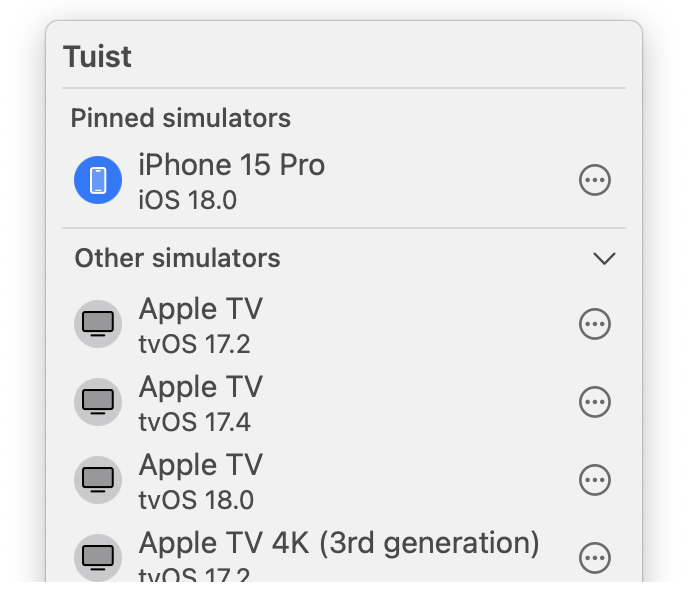
How the Tuist app streamlines the Tuist Previews flow
Until now, you would share and run Tuist Previews exclusively with the CLI:
tuist share Wikipedia --platforms iOS --configuration Debug
tuist run https://tuist.dev/tuist/wikipedia/previews/0191984a-8d33-754d-806b-bfecfd65f1c9
Clicking on the Preview link wouldn't do anything. This changes now. After you install the Tuist app on your Mac, opening the link in the browser will automatically run the shared app in the simulator that you selected in the menu bar app.
To select a simulator, choose one from the list in the menu bar app. You can also pin your favorite simulators, copy their names and identifiers, and launch them.
Check out the video below to see the new app in action:
Future Preview Improvements
Wondering what else is coming to Tuist Previews? Here are some of the features we're working on:
- Run builds on your device, not just simulators: We are laying the groundwork to enable this functionality while simplifying the signing process for you. We want to ensure that signing complexities don’t detract from your experience, and we have the solution to make it seamless.
- Download the latest builds of apps from your organization: Want to try out the latest version of an app? You’ll soon be able to do so directly through the app. Imagine having a badge in your repository’s
README.mdthat opens the app with just a click — mind-blowing, right? We’ll support that too. - Android previews: We are exploring our path into the Android ecosystem and figuring out how we can provide value there. Android Previews might be one of the first steps in this direction.
Do you have any suggestions or want to get involved? Let us know on our GitHub or join the Slack community. The app is completely open source, and you can find it here.
The Future of the macOS App
Although the macOS app is currently focused on previews, we don’t plan to stop there. We’ll continually seek out opportunities to enhance Tuist by leveraging the native capabilities of the platform, aiming to make your development experience even more enjoyable. We are committed to developing a flexible and well-documented API, enabling any contributor to extend the app’s capabilities and even build their own clients using Apple’s robust technologies.